In short
- Your profile feeds the common-ground icons: your tags, kinks, hobbies, favourites and languages are what Discover compares with every other Dude. Empty sections = no icons, with anyone.
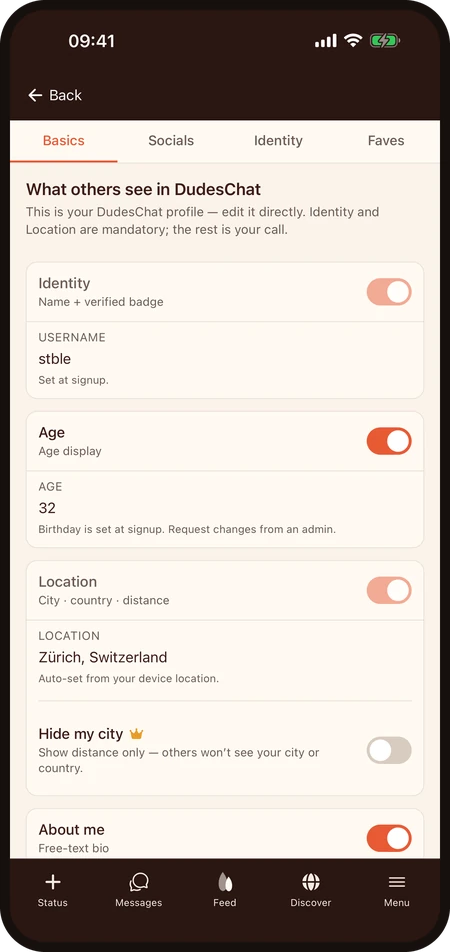
- Edit it all under Menu → Edit my profile, in four tabs: Basics, Socials, Identity and Faves.
- Photos live in albums: a public album (your face to the world) and private albums you unlock per person.
- Almost every section has an on/off switch. You decide what's public.
Why a full profile matters
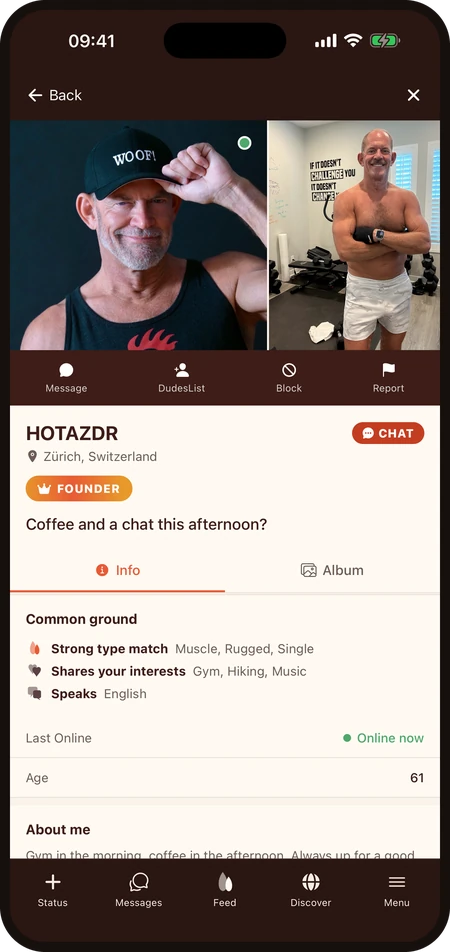
On DudesChat, your profile isn't decoration. It's input. The three common-ground icons next to every Dude in Discover (a flame for type, hearts for interests, a speech bubble for language) are computed from profile data, in both directions: how well he fits what you're into, and how well you fit what he's into. The tags, hobbies, favourites and languages you pick are the raw material. A Dude with empty sections earns no icon with anyone, never shows up under the Match filter, and gives nobody a reason to say more than "hey".
Beyond the icons, a filled profile is openers: a shared language, the same game, that band. And his profile shows them to you under Common ground. Ten minutes of filling things in beats a hundred "sup" messages. How the icons are earned is on the Discover & matching page.
The basics: Menu → Edit my profile
- Identity: your username and verified badge. Always shown; Supporters can change the username under Menu → My Account.
- Age: computed from your date of birth. You can hide it with its switch.
- Location: city, country, and distance, derived from your coarse position. Always on; Supporters can additionally hide their city name. Your exact position is never shown to anyone; see Privacy & your data.
- About me: free text, up to 2,000 characters. The one section written in your own voice; a couple of honest lines outperform a wall of emoji.
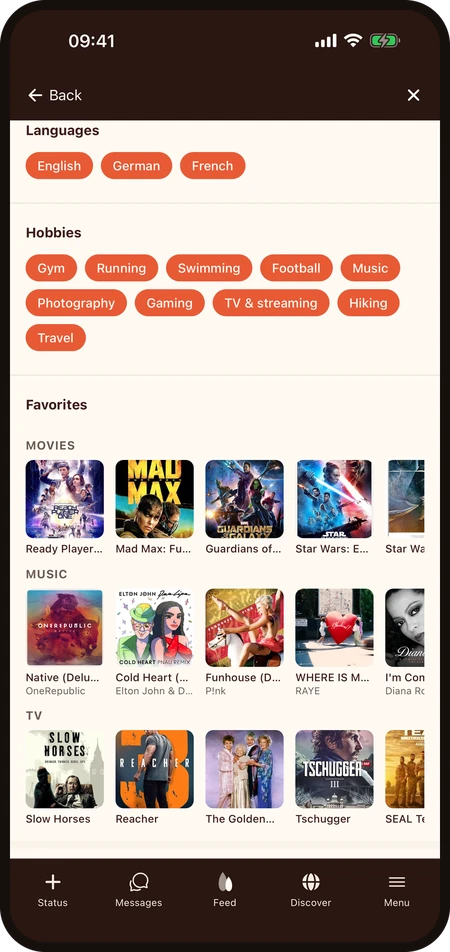
- Languages: the languages you speak. Small detail, big deal when someone nearby realises they can drop into their mother tongue. And it's searchable.
- Hobbies: gym, travel, gaming, cooking… pick what's true. Hobbies are search filters too, so they make you findable.
Sexual identity: its own tab, your call
Under Menu → Edit my profile → Identity live the sections that describe what you're into, each with its own visibility toggle, and two of them doing double duty as match inputs:
- Position & identity: your position and related details.
- "I Am" tags: the communities that describe you.
- "I Am Into" tags: the communities you're drawn to. These two tag sets, with your kinks, are what the type icon (the flame) is computed from: the single highest-leverage thing you can fill in.
- Kinks: a separate list with its own toggle, on by default. Hide it whenever you want to.
- Health & Protection: safeguards and vaccines you choose to show. Your last-tested date is private unless you switch it on: share it and others see only how long ago it was ("3 weeks ago", never the exact date), and hiding the section hides it too. Your test reminders stay always private, visible to you alone.
Socials & Favorites: the rest of you
- Socials (Edit my profile → Socials) let you link your other handles: Bluesky, X, Instagram, Steam, Twitch, Letterboxd, Goodreads, Strava and more. You type the handle, the app builds the link, and people find more of you exactly where you want them to.
- Favorites (Edit my profile → Faves) are your taste shelf: pick up to 3 of 6 categories (music, podcasts, books, games, movies, TV) with up to 5 picks each. You search the real catalogue and pin the actual album, film, or game, cover art included. Three categories, not six, because a focused shelf says more than a data dump. And "wait, you're into that too?" is the best opener in the app.
Photos & albums
- Public album: your face to the world, with 6 slots for members and Supporters alike; slot 1 is your main photo, which goes through human review (that's the activation step from Getting started). Replacing it? Your current photo stays live until the new one is approved, so you're never invisible in between.
- Private albums: photos you unlock per person, one Dude at a time, from a conversation. 6 slots each: members get one private album, Supporters four. Nobody sees inside until you unlock it for them; Messaging covers how unlocking works.
- Videos: album clips run up to 15 seconds for members and 60 seconds for Supporters, with an in-app trimmer to cut the right moment.
Every photo and video must be of you (you confirm that on each upload). There is no porn anywhere in the app, and your public profile shows nothing explicit. The Content Guidelines draw the exact lines.
Who sees what: two layers of control
- Your toggles: most sections carry an on/off switch (age, about, hobbies, sexual identity, kinks, health…). Off means that section doesn't exist on your public profile. Synced across your devices.
- Your viewing preferences: separately, Menu → Viewing Preferences controls what you see on other Dudes' profiles. Not interested in seeing kinks sections at all? Switch the category off and it disappears from every profile, and from your search filters. Every category starts on; switch off whatever you'd rather not see.
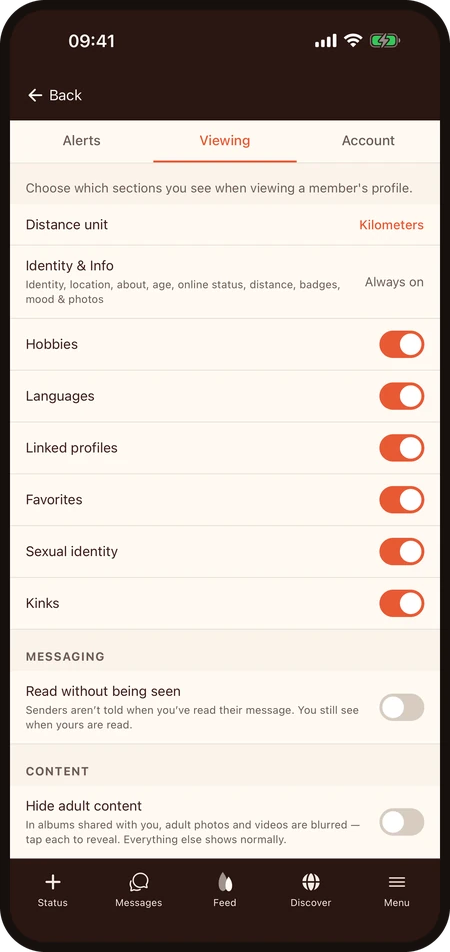
One honest note: sections you hide can't help your matches or make you findable in search. Hide what you want, but know the trade.
Moods: the living part
The one profile element that's meant to change constantly: your mood, what you're up for right now, with an optional one-liner. It's big enough to have its own page: Moods & the Feed.
Last revised: 2026‑09‑12